DisplayPilot icon
macOS window and workspace utility

Restore desktop clarity and focus in one click.

No more messy windows every time you connect or unplug displays. DisplayPilot remembers your ideal window layout and app setups across all monitors, returning you instantly to deep work.

DisplayPilot requires Accessibility permissions for window positioning and reads authorization from DisplayPreset on the same Mac.

Smart Window Snapping

Stop dragging and resizing windows by hand. Capture coordinates and screen zones for all open apps and restore them instantly.
Task Workspaces

Group dedicated apps and layouts for coding, writing, design, or meetings, transitioning seamlessly between workflow contexts.

Instant Menu Bar Access

Right-click the menu bar icon anytime to switch display setups, layouts, or workspaces without interrupting your focus.

100% Local & Private

Operates entirely on your device with no accounts, telemetry, or remote servers, verified locally via DisplayPreset.
Crafted for clarity and focus.

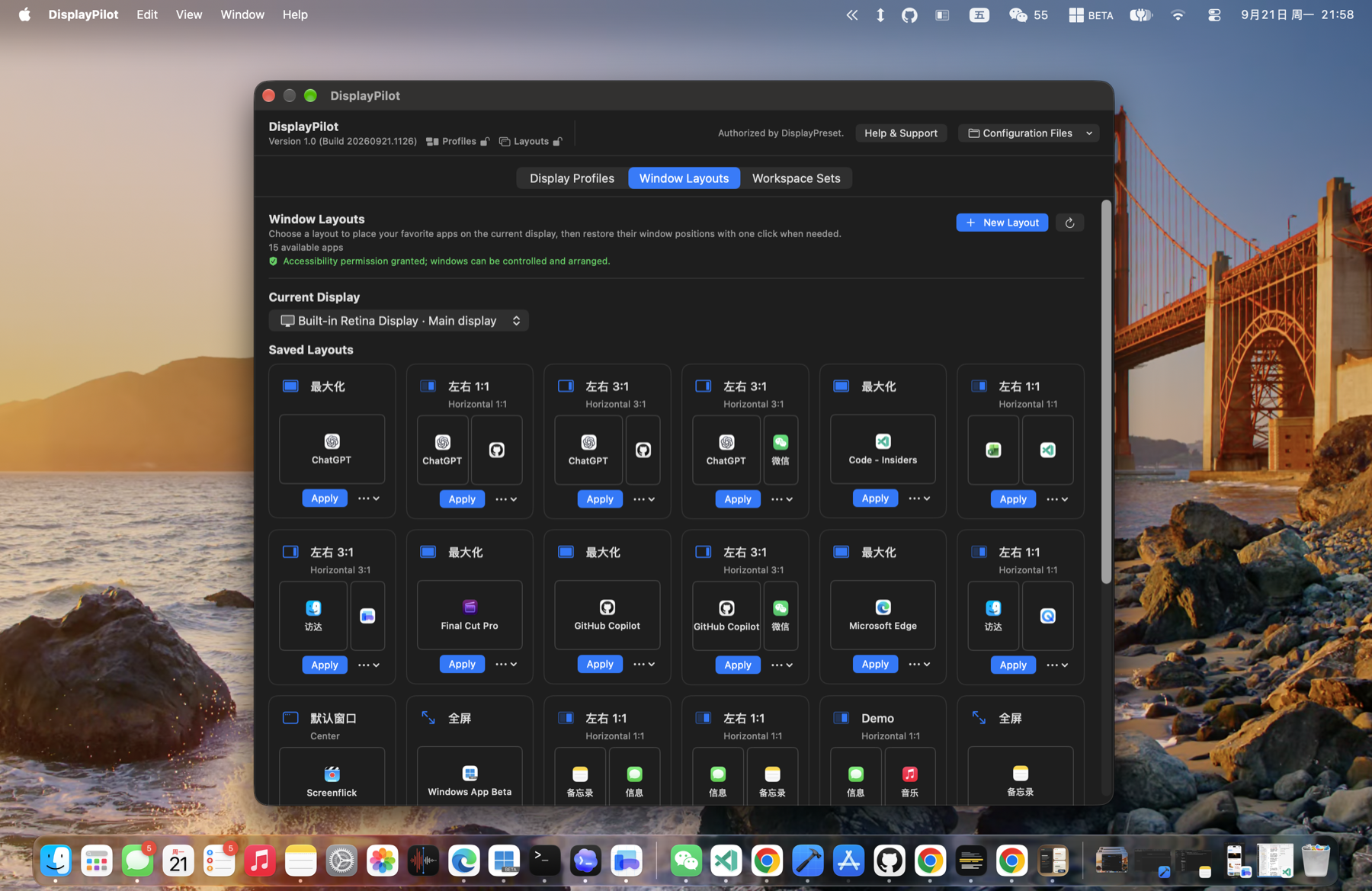
DisplayPilot Window Layouts screen
Window Layouts Assign running application windows into clean, dedicated display zones.
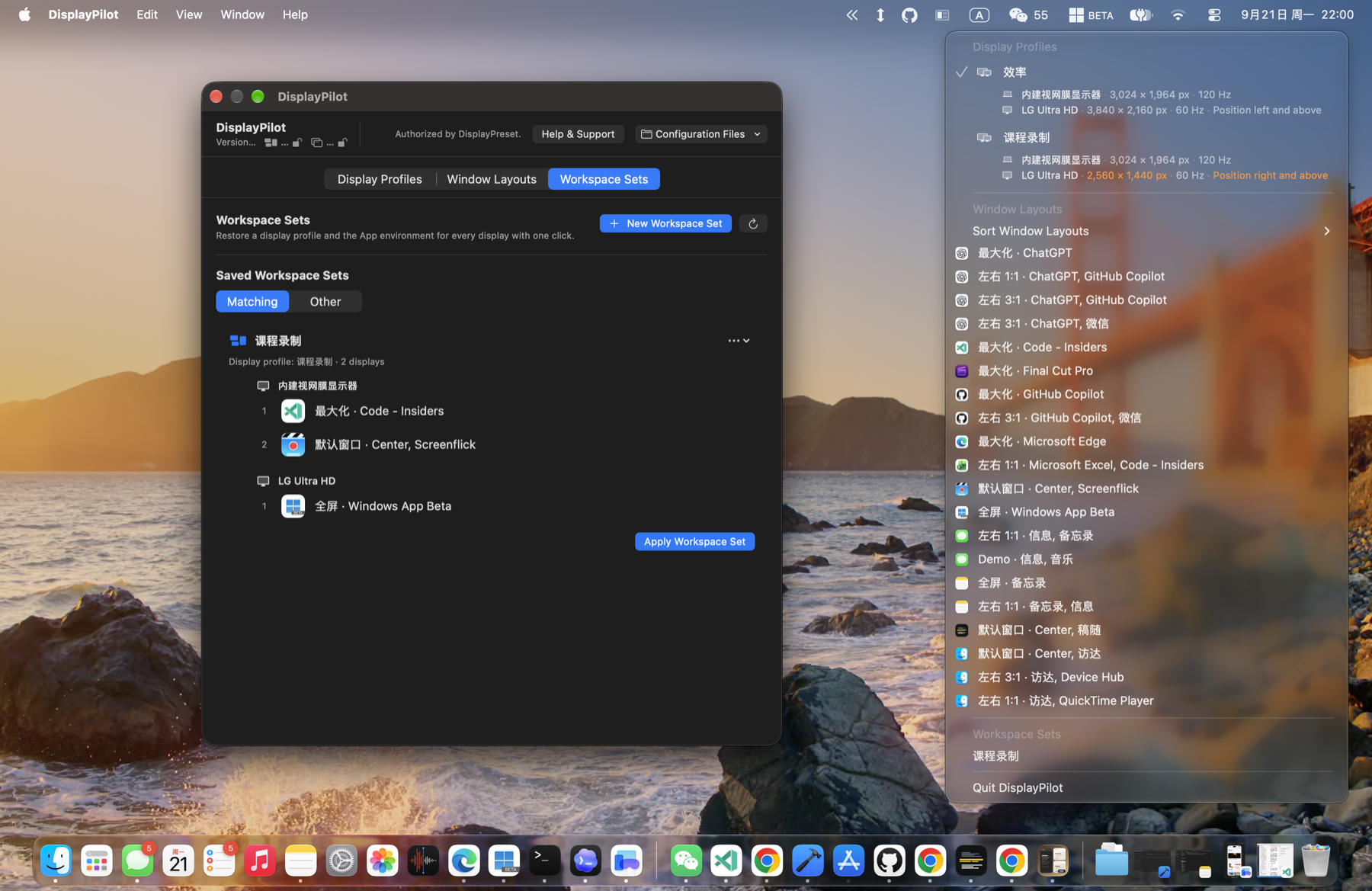
DisplayPilot Workspace Sets screen
Workspace Sets One-click restoration of multi-display profiles alongside designated app window sets.
DisplayPilot Status Bar Menu screen
Status Bar Quick Menu Right-click the menu bar icon anytime to switch profiles, layouts, or workspace sets in an instant.
Integration

How DisplayPilot and DisplayPreset work together

DisplayPreset and DisplayPilot are built to complement each other cleanly while we strictly adhere to Apple's App Store and macOS security guidelines.

Your Quick Setup Guide (5 Simple Steps)

  1. Install DisplayPreset: Download and install DisplayPreset from the Mac App Store.
  2. Complete purchase: Unlock unlimited profiles in DisplayPreset via standard in-app purchase.
  3. Install DisplayPilot: Download and launch DisplayPilot on the same Mac.
  4. Recheck authorization: In DisplayPilot, click “Recheck Authorization” (or let it verify on launch).
  5. Enjoy full power: DisplayPilot verifies the Apple-signed StoreKit receipt in local App Group storage, instantly unlocking your window and workspace capabilities.

Why did we create two separate apps?

DisplayPreset is available on the Mac App Store, sandboxed, and handles hardware display arrangement profiles and StoreKit purchases securely through Apple. DisplayPilot operates with macOS Accessibility permissions to manage third-party app windows and launch application workspaces. By sharing entitlements locally through Apple's App Group container, you get advanced desktop window orchestration without extra fees.

Limited-Time Promotion & Independent Licensing Notice

DisplayPilot does not process payments, collect billing information, or run remote payment portals on this website. All transactions are handled securely through Apple's Mac App Store inside DisplayPreset.

As an introductory limited-time promotion, DisplayPilot currently recognizes valid DisplayPreset in-app purchases on the same Mac. Purchasing DisplayPreset is solely for unlocking DisplayPreset's own features and carries no perpetual licensing commitment or bundled entitlement for DisplayPilot. Promotional eligibility may change in future releases.

Read Licensing & FAQ